It’s been almost a year and a half since the previous News & Updates episode, so you can imagine that there is quite a bit to report on. There are new features in Google Maps in general, but I’ve also spotted a number of changes that are first and foremost meaningful to local guides, especially those who regularly make edits.
Make sure to stay tuned until the end, as I also have some nice stories showcasing the impact Google Maps can have these days in our everyday lives.
SHOWNOTES
-
-
- Email: letsguidepodcast@gmail.com
- My personal blog: janvanhaver.com
- The local guides section on my blog
- Find me on Connect
- Helpdesk article explaining ‘Screenhot to save’
- PC Mag’s article about the Follow feature’s removal
- Video about the moved pin in Giethoorn
- Video about road closures in Zandvoort
- Newspaper article about road closures in Zandvoort
- TechPulse article about traffic jams in Italy
- Story about the Argentinian police officer on StreetView
- Newspaper article about the Volcano in the Netherlands
- Maps entry for the volcano
- Sign up to become a local guide yourself
- Local Guides Connect – the official forum for Local Guides
-
SCREENSHOTS
In a number of cases, screenshots are referred to in this episode. I have added those here.
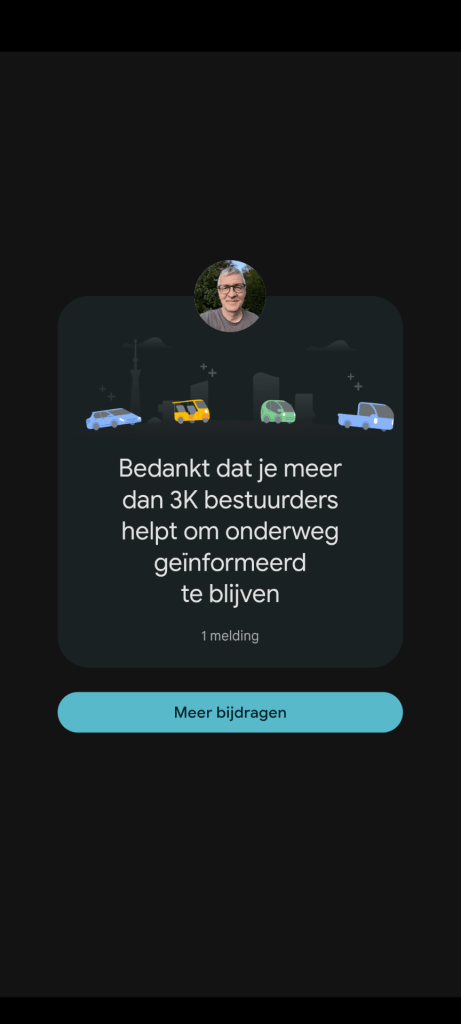
Notification about over 3000 drivers being informed by the navigation information I provided.
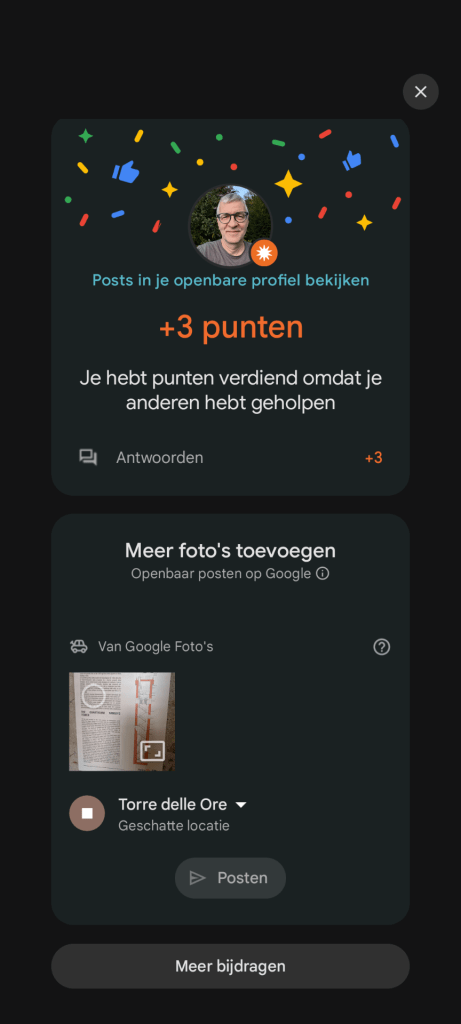
Appeal to upload pictures to places in the splash screen informing you about points awarded for contributions.
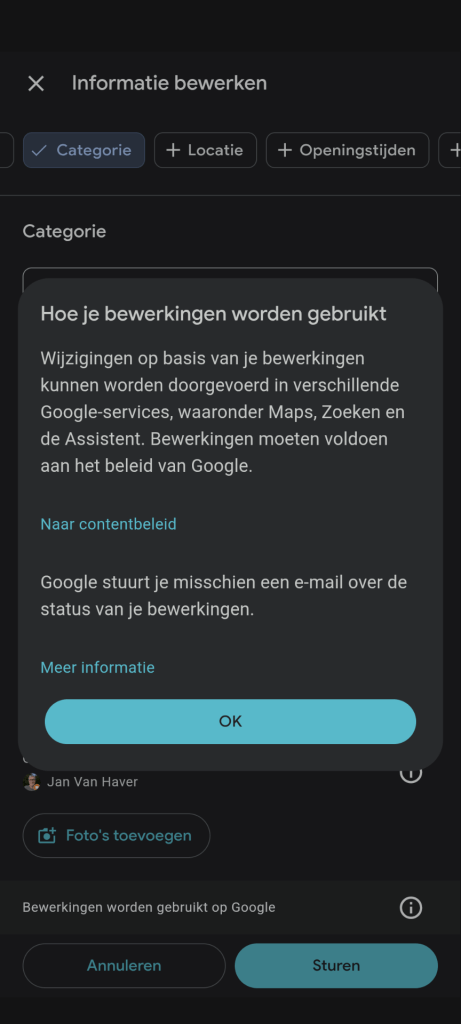
Pop up after making edits explaining that your edits will be used in several products.
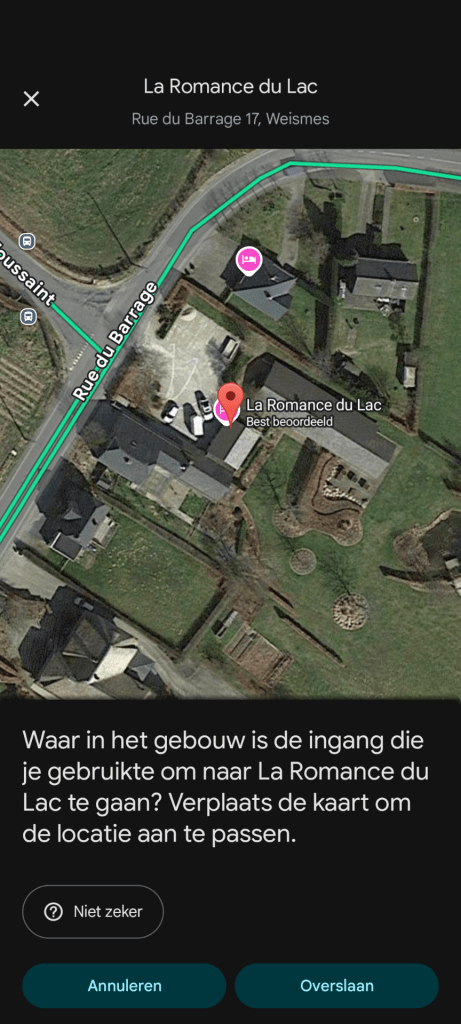
Question popping up to ask where the exact location is of a building – popping up shortly having visited that place.
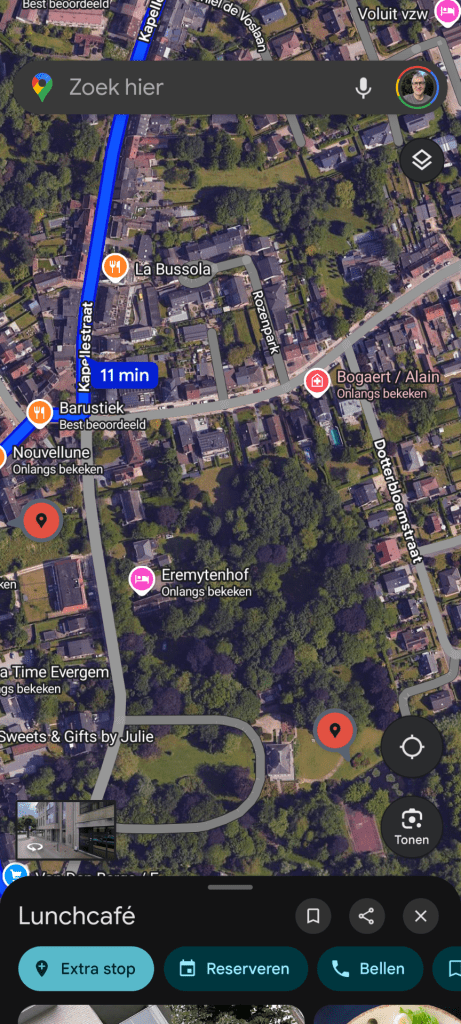
Not 1 but 2 pins to indicate that the place(s) selected are no longer shown in the map area currently displayed on your screen.
TRANSCRIPT
Spotify automatically creates (with AI) transcripts of each episode – I am adding that here, but without having checked in full detail. The content might therefore not be 100% accurate.
0:07
Hello dear listeners around the globe, welcome to yet another episode of the Let’s Guide podcast.It’s been almost a year and a half since the previous news and updates episodes, so you can imagine that there’s quite a bit to report on.
0:23
There are new features in Google Maps in general, but I’ve also spotted a number of changes that are first and foremost meaningful to local guides, especially those who regularly make edits.And make sure to stay tuned till the end as I also have some nice stories showcasing the impact Google Maps can have these days in our everyday lives.
0:48
Before starting, as usual, I want to point out that I’m not an official representative of Google or the Local Guides team, just a local guide myself.Everything you hear in this podcast is therefore my personal interpretation of things.This episode #53 is recorded at the beginning of October 2025 and is therefore relating the situation as it is today.
1:15
Should you be listening at a later date?Later date?Things might obviously have changed.Let’s get started.Let’s dig in with the features that are visible to all users when using navigation.
1:31
You might already have seen messages pop up about, for example, traffic lanes being closed due to construction and a question to either confirm that this is still the case or to inform that this is no longer the case.For people who have already used the navigation app Waze, which is also owned by Google, of course this is a familiar feature.
1:54
But now this is showing up since a while already in Maps as well.That makes some people speculate that Google will merge their two navigation apps into one product.Especially since the two teams, the development teams behind the two products were brought together in the so-called Geo division which also contains Google Earth and Street View.
2:18
That happened at the end of 2022, but there are no official statements or indications to support that claim that the 2 might be merged.A nice additional feature in that same context is that when you have reported something during the use of the navigation in maps, or answer a question, for example confirming Rd works are still ongoing, you can now get messages popping up on your phone to show that you’ve to show that you’ve helped X number of drivers.
2:52
I captured this in a screenshot and will share that in the show notes for this episode.Getting such kind of feedback is always very rewarding, so if members of the Google team would be listening at this point in time, please keep doing that.
3:12
Other notifications I see more and more recently are likes on pictures.Also on older pictures, such as a 7 year old picture I took of the Pinterest headquarters in San Francisco.All of a sudden getting a lot of likes that picture.
3:29
This could actually be linked to a new maps feature that was released a while ago.If you like a picture right now, you can get the heart symbol of course for the like.But in certain some circumstances that heart symbol can also be combined with something from the picture, for example French fries or a pizza.
3:49
And that leads to a kind of combined like that you are shown.So probably that’s leading to more likes on pictures.My own experience anyway, the first time I encountered this was to go and look for other places if I could see that there were any suitable pictures to generate these kind of combo likes and then like those pictures to see what the results would be.
4:17
I’m probably not the only one.A new feature which is not yet available to all users is adding places from screenshots, according to the official help desk article which I will link to in the show notes.Of course, it’s only available right now in certain countries, and only on iPhone and iPad.
4:37
I guess and hope Android and more countries will follow soon.The feature is called Screenshot to Save and it will use Gemini, Google’s AI, to analyse your screenshots, searching especially for names of places.
4:53
It then stores the places found in a list and you can then review that list to decide if you want to add the places it found to one of your existing lists.For people taking a lot of screenshots, and I understand that there are loads of those people, this might be quite useful.
5:15
And also the fact that they built in this review step is a wise decision if you ask me, to avoid that your existing lists will get littered with AI generated clutter.Gemini is no doubt one of the leading AI tools, but as we all know by now, no AI system is perfect, so human moderation is still needed and will probably be needed for a while to come.
5:44
Those amongst you who have been using Google products for a while are well aware that new features and products are not only added to Google’s line up but from time to time things also get removed and that is now the case with the follow function in Google Maps.
6:02
Since a couple of years you were able to follow other local guides inside Google Maps, which meant that you would see their content like reviews prominently when checking out a place or a city where they had been active.It could be seen as a kind of attempt to introduce some sort of social network layer, but apparently the way it was used did not match the expectations of the Google team for this feature, so they now have decided to disable it completely.
6:35
I myself have never been a big fan of it as it was way too limited for the uses that I had in minds.For example finding all the local guides in your area or in a city that you are visiting.The removal is already ongoing since September, as explained in a an article from PC Mag I will link to in the show notes.
6:57
But at the time of this recording I still see the number of local guides following me in maps, as well as the fact that I was following back zero of them.But I guess the change will be rolled out gradually, so I expect it to be gone soon.
7:13
I do indeed see a message on my profile announcing the removal with a Dutch translation error in it.Nothing new there.In an upcoming episodes I will then probably probably be able to report on what has replaced it, as the number of followers has a quite prominent place on your Maps profile page, right next to the number of contributions.
7:41
And that seamlessly brings us to the new features that are more relevant for Local Guides.The first ones are related to the splash screen that you get to see on your phone.When you’ve made a contribution, you know that screen showing that you have earned 5 or 10 or 20 or 15 or whatever number of points.
8:01
You might have noticed that something has changed about that screen recently, but perhaps we’re not able to pinpoint what exactly changed.Well, let me tell you, the X to close the splash screen moved from the top left to the top right corner of the screen.
8:18
For me, as a left-hander, it was pretty convenient to have it in the top left, but I also have to admit it’s more in line with the usual spot where the X2 close is found on screen.So OK, we’ll live with it.Another novelty I noticed about that same splash screen is that underneath the block about the points that you earn.
8:40
There sometimes has been a request to upload pictures to places you have visited.I’ve only seen this for a brief period so I guess they were testing this out.Fortunately I made a screenshot so that can be found in the show notes.
8:58
Another type of pop up screen I get from time to time is specifically related to submitting edits.Not during all submissions, but every 3rd or so.This pop up message informs you how your edits are used.
9:15
Another screenshot can be seen in the show notes.It says that your edits can be used for various Google products such as Maps, search and assistance, and it also contains a notification that you may receive e-mail about the status of your edits.
9:32
Yes, bring them on, definitely.And in case you would think that the new types of pop up screens that I have encountered are through now, you’re wrong.A really nice one popped up on my phone only once so far and it was the question to position the entrance of a building and it’s the question showed up shortly after having visited that place.
9:57
I’ve made a screenshot of course, and you can see that in the show notes.By the way.Also the opposite is is possible in maps.In some areas you can change the best point in the streets for getting close to the to entrance of a building.
10:16
To do so you need to select an address.So not selecting a point of interest, not the restaurant or a hospital or whatever, just an address.You click on the House number and then in a number of menus you have to go through it’s edit the address, suggest an edit, fix an address, update St entrance and then you can tap on the road to select the best arrival point from the streets or reposition drag to reposition the one which is already there.
10:49
I’ve seen that in Germany and the UK, but not in my home country in Belgium.So possibly this is only available for countries where the actual house numbers are shown on the map.
11:07
And to get completely into the nerdy part of using maps, the previous section was also quite nerdy already.OK, admitted.Here’s something I discovered by accident.When your selected point of interest is no longer on display on the screen of your phone, a red pin with a grey background will appear, with the pin pointing towards the direction of where your point of interest is of the map.
11:38
But there can be two of those pins.That’s what I discovered by accident.To see this, what you need to do is first select a destination for navigating somewhere, then zoom until the navigate the destination is no longer on the map.
11:55
Then select another point of interest as if you would want to add an extra stop and with that point, with that PO point of interest selected, move to yet another area of the map.EV voila, two of those pins, red pin with grey background with a point are shown.
12:16
Of course a screenshot of that will also be included in the show notes.Something else I noticed recently, and that could be there already for a long time but I never saw it before, is that you can have a link to WhatsApp on places on Maps next to the place where you can see the URL.
12:39
It’s similar to the links for Uber Eats for example, you find on certain restaurants.It’s always nice to see those kinds of integrations as in real life most people use also other products than Google products of the, although the Google team would probably probably prefer that to be different.
13:00
One final thing about scrolling around maps and making edits.No, actually two final things is first, the layouts of the information page about places on maps.That has changed.It used to be almost a full screen, so when you select the place and then go into the details, now that’s a kind of screen on top of the map with rounded corners.
13:27
The most striking difference to me was that the place where suggest an edit is shown, That used to be represented in the same way as the name, the address, the category, but now it’s clearly separated, which I find to be much better.
13:43
And then the 2nd and real final point is something that’s struck me while making edits and exploring the map is that you used to find a lot of points of interest, a lot of businesses in the middle of the street.
14:01
This is much less the case these days.I hardly come across those anymore.So perhaps it’s Local Guides doing great Local Guides Clean the Map work, or Google is getting better, or probably both.
14:20
For local Guides that are active on Local Guides, Connect, the official forum.There’s also an exciting new thing called scavenger Hunts.The idea is to create a team of five to 10 people and then get together in a city and go on a kind of treasure hunt that can last up to 12 hours.
14:40
I’m not going to go into full detail here, as you can check it all out on the Connect link to the official post in the show notes.Of course, make sure to join a team for the scavenger hunt near you or set one up if none is there yet.
15:00
As I mentioned at the start of this episode, there’s also some nice stories that I would like to share that show the societal impact of Google Maps stories depicting how Maps is influencing our everyday lives.The first story is about a hamburger restaurant in Belgium called The Snacks.
15:21
They were wondering why on earth they were getting much less, much less customers for months already.Was there something with their pricing?Were they too expensive?The weather to do something to do with that?They could not figure out the answer until a customer told them that he was so happy that they were open again.
15:42
Turned out that their business had been marked as permanently closed on maps, which clearly has an impact on the choices people make when looking for a place to eat.Another anecdote is also related to a business making much less money.
16:00
It took place a few 100 kilometres north of the previous one in the Netherlands, in a place called Heathorn, a well known tourist destination.A business renting boats to travel along the picturesque’s canal in the area noticed that their revenue all of a sudden dropped dropped by 2/3.
16:22
The explanation turned out to be that the pin on Google Maps for the City of Heathorn.That’s the location where the navigation will take you if you simply enter a city name without a specific address.Well, that pin was moved from the more northern part of the city where the business is located to the actual city centre, 3 kilometres to the South.
16:46
Google did this by request of the local authorities, because the previous location of the pin was actually in a residential area.In the show notes I’ll link to a video in Dutch, but you’ll probably be able to make English subtitles in real time for that.
17:07
Let’s now move a bit W from Heaton to Zonforth, a popular destination for people in search of a beach along the Dutch coast.Locals were fed up with loads of tourists parking in their residential area, even creating dangerous situations at times.
17:25
They were so fed up that they coordinated as a group and used the feature to report navigation issues, issues on maps and sent a bunch of reports to maps that the road was under construction.And lo and behold, after a while the road was indeed marked on maps as closed and tourist traffic was diverted.
17:47
There’s hope, however, that this kind of situations could be avoided in future, at least in Europe, as a new European law is being implemented, the so-called Delegation Regulation 2022/67-O, which is designed to obligate mapping services like Google Maps to work more closely with Rd authorities and apply the info from local authorities as primary source of information.
18:18
That law will go into force in a staged way between 2025 and 2027.More info on that in another video in the show notes, and also an article from the Dutch newspaper The Telegraph.Something similar, but by accident, happened in the north of Italy, by the way, at the start of last year’s summer, when a part of the highway was incorrectly marked as closed.
18:45
This caused a very smooth ride for those not using maps for navigation, but obviously giant traffic jams for the drivers who did.They got stuck for hours on smaller local roads before the traffic authorities stepped in and used digital traffic signs to inform drivers that the road was actually not closed.
19:08
To finish off this section, there are two more stories which are in fact quite funny, although perhaps not to the person involved.In the first one.It was a police officer from Argentina who was caught on Street View images of the place where he lived.
19:26
As you will know, in such in such cases faces are automatically blurred for privacy reasons, but only faces, not other body parts.And the problem was that he was filmed by the camera as he was in his garden naked.
19:44
He did have a fence to make sure that he could not be seen by people walking by, of course, but apparently the Street View camera mounted on top of the car was higher than the fence and thereby caught him naked on Street View.
20:00
Apparently he was clearly recognisable, although he was filmed from from the back, so he sued Google over this.It’s actually happened in 2017 already, but this summer a judge sentenced Google finally to pay €11,000 to that naked Argentinian police officer.
20:21
The other funny anecdote takes us back to the Netherlands.In the north, between the Wadden Islands and the mainland, there’s the Wadden Sea.Hidden under the water.There, there’s an actual volcano called the Zurdwolf Vulcan South Wall Volcano, translated literally.
20:40
But that volcano has been extinct for millions of years.The volcano, however, had been added to Maps as a point of interest already some years ago, but the newly available generative AI tools have now inspired a number of pranksters to add AI generated pictures of an active volcano with lava erupting from it to the Maps entry for the volcano.
21:06
There’s also reviews as if this were an actual tourist attraction.Some of those are quite funny, and some of those are still available on Maps.All the AI pictures have been removed by now.I’ll link to an another newspaper article which still includes some of those pictures if you want to see what that looks like.
21:27
And I’ll also link to the actual place on maps where you can still read some of those reviews.And that’s more or less it’s what I wanted to share as news and updates for this time.Should you have any other questions, comments or remarks about anything related to Google Maps or the Local Guides programme, don’t hesitate to get in touch.
21:51
You can send an e-mail to letsguidepodcasts.com.Find me on Local Guides Connect, the official forum as Connect moderator Young Van Haver and the show notes, which will be quite long and frequent this time, can be found, of course, on the website of the podcast Let’s guidepodcast.com.
22:14
Thank you very much for listening and stay tuned for future episodes.Game over.
 LetsGuide Podcast